
Review dependencies, cleanup risk, scope, and conflicts with clearer operational context.
Veridominus is a native Mac application for dependency review, cleanup safety, scope clarity, conflict investigation, device lookup, command submission, and follow-up work. It sits beside Jamf Pro. It does not pretend to replace it.
Mac App Store billing. 7-day free trial. No server to deploy. Direct Jamf Pro connection.
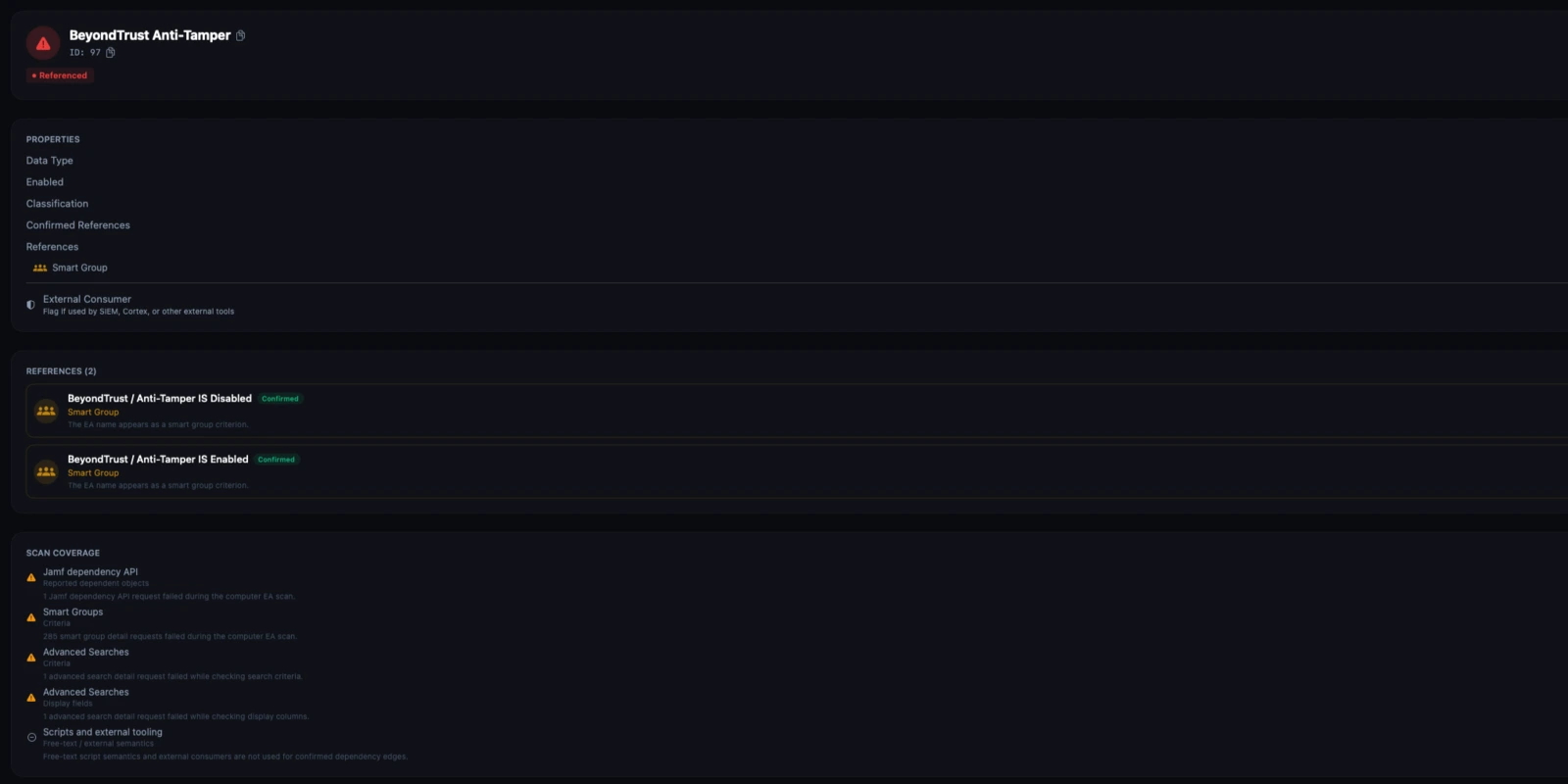
Confirmed references, unsupported exact references, and review-required signals stay separate.
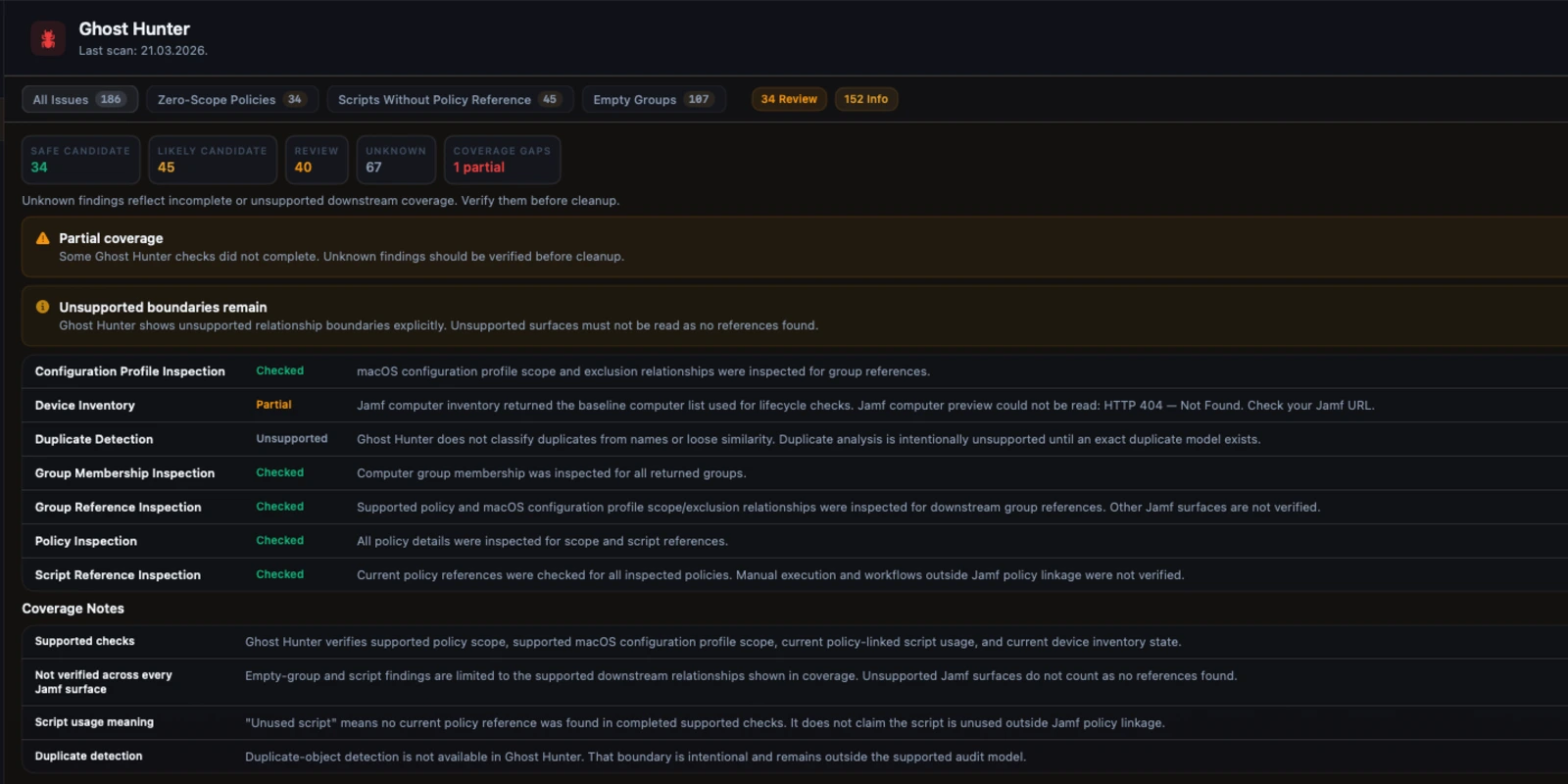
Safer candidates stay separate from review-required and unknown findings when downstream coverage is incomplete.
Veridominus does not replace Jamf Pro. It gives administrators a calmer starting point for dependency review, cleanup safety, scope verification, and follow-up work.
Inventory snapshot
Counts remain tied to the current Jamf response. Unavailable data stays unavailable instead of becoming zero.
Freshness state
Current, stale, local-only, and unavailable workflow states stay separate so review starts from the right source of truth.
Direct next action
The dashboard routes straight into EA review, Ghost Hunter, profile conflicts, and other follow-up workflows.
Jamf Pro gives you control. It does not always give you enough review context.
Veridominus is built for the work that slows down when administrators need to inspect multiple Jamf surfaces just to answer one operational question.
Dependencies are easy to miss
Jamf often exposes relationships in the source object, not as a review surface. Extension attributes, scripts, groups, and profiles can affect other workflows without one obvious place to verify that safely.
Cleanup work is risk-heavy
Zero-scope policies, stale devices, empty groups, and apparently unused scripts all require manual checking. Without structured evidence, teams either defer cleanup or take avoidable risks.
Scope is hard to explain
Inclusions, exclusions, groups, departments, and buildings combine into targeting that is difficult to verify quickly. A simple applies or does not apply label is not enough.
Conflict and overlap stay buried
Configuration profile overlap, smart-group meaning, and patch posture all exist in Jamf, but the path from raw data to operational understanding is often slower than it should be.
A local operational intelligence and review layer for Jamf Pro.
The product is designed for experienced Jamf administrators who need more trustworthy review workflows, not for teams looking to replace Jamf with a second management plane.
Veridominus is a native macOS operational intelligence and review layer for Jamf Pro administrators.
It is not a Jamf replacement, not an MDM platform, and not a hosted management layer sitting in front of Jamf.
Jamf remains the system of record. Veridominus helps administrators reason about cleanup, dependency, scope, conflicts, and day-to-day operational work with more context and less friction.
Structured around the work Jamf administrators actually do.
Veridominus spans dependency review, cleanup safety, scope clarity, operational lookup, and remediation follow-up. Each workflow is framed by what the product can confirm and where it stays conservative.
Dependency and cleanup review
Workflows for verifying what is referenced, what is uncertain, and what can be reviewed more safely before change.
Supported dependency analysis with confirmed references, unsupported exact references, review-required signals, and explicit coverage boundaries.
Conservative orphaned and cleanup candidate review with evidence, confidence, and Unknown when downstream coverage is incomplete.
Supported downstream impact review before a supported object is changed or removed.
Conflict classification and payload overlap review for macOS configuration profiles.
Scope and targeting clarity
Workflows that show why something targets a device or group, where exclusions matter, and where Jamf does not expose complete causality.
Direct scope, group-based scope, exclusions, and partial-resolution limits surfaced in one view.
Structured criteria presentation, current membership review, and explicit limits around per-device causal explanation.
Compliance reporting based on real Jamf patch data, with drillable version and inventory state.
Current Apple release context and fleet OS exposure from the available data sources.
Operations and follow-up
Fast investigation, controlled command workflows, and a durable remediation queue for day-to-day Jamf administration.
Fast search by supported identifiers with authoritative device detail, freshness context, and operational actions.
Bulk command submission with explicit submission state, partial success handling, and no fake execution certainty.
Readable script inspection, guarded editing, and usage context where Jamf linkage can be confirmed.
Persistent local follow-up tracking for remediation work, notes, and linked findings.
Major product surfaces, presented in operational terms.
Each workflow below uses one consistent structure: what it does, why it matters, and how it works.
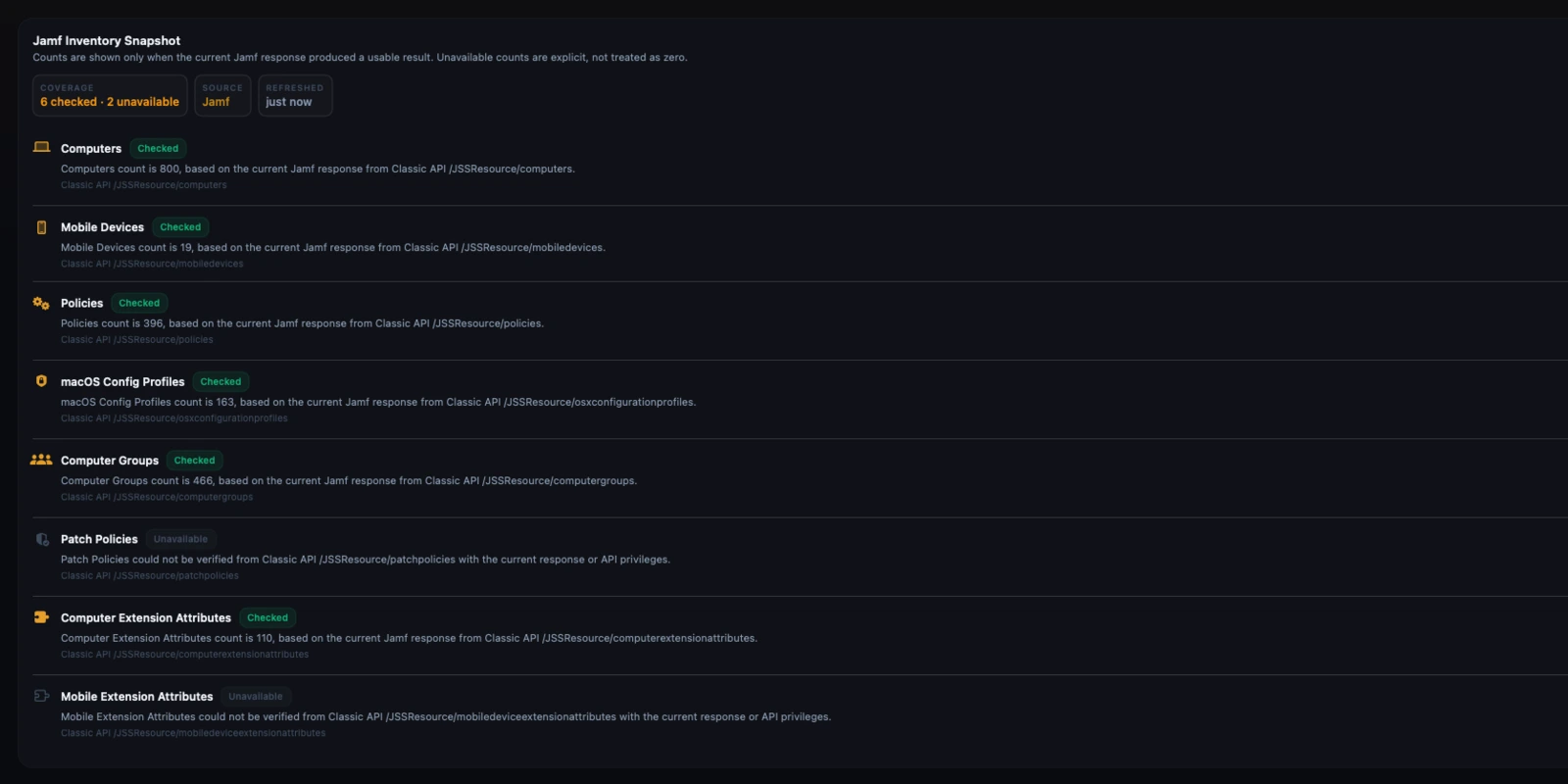
Overview Dashboard and Fleet Health
The dashboard shows point-in-time operational signals, data freshness, and direct routes into the workflows that need attention.
Admins need to know what needs review now, why it matters, and where to go next. Vanity health scores do not help with production work.
Metrics stay tied to real Jamf data. Freshness, unavailable counts, and local-only state remain explicit instead of being flattened into decorative summaries.
EA Dependency Scanner
Review where an extension attribute is referenced across supported Jamf surfaces before you edit or remove it.
Extension attributes turn into shared dependencies quickly. The risk is rarely the EA itself; it is the policy, group, search, or managed configuration logic attached to it.
Veridominus keeps confirmed references separate from unsupported exact references and review-only signals. Coverage rows show what was checked and what was not.
Ghost Hunter
Audit stale devices, zero-scope policies, empty groups, and other cleanup candidates without overstating what is safe.
Cleanup work is where weak tools do real damage. If evidence is partial, the result must read as uncertain, not safe.
Ghost Hunter separates Safe Candidate, Likely Candidate, Review Required, and Unknown. Evidence and coverage are visible in the review flow.
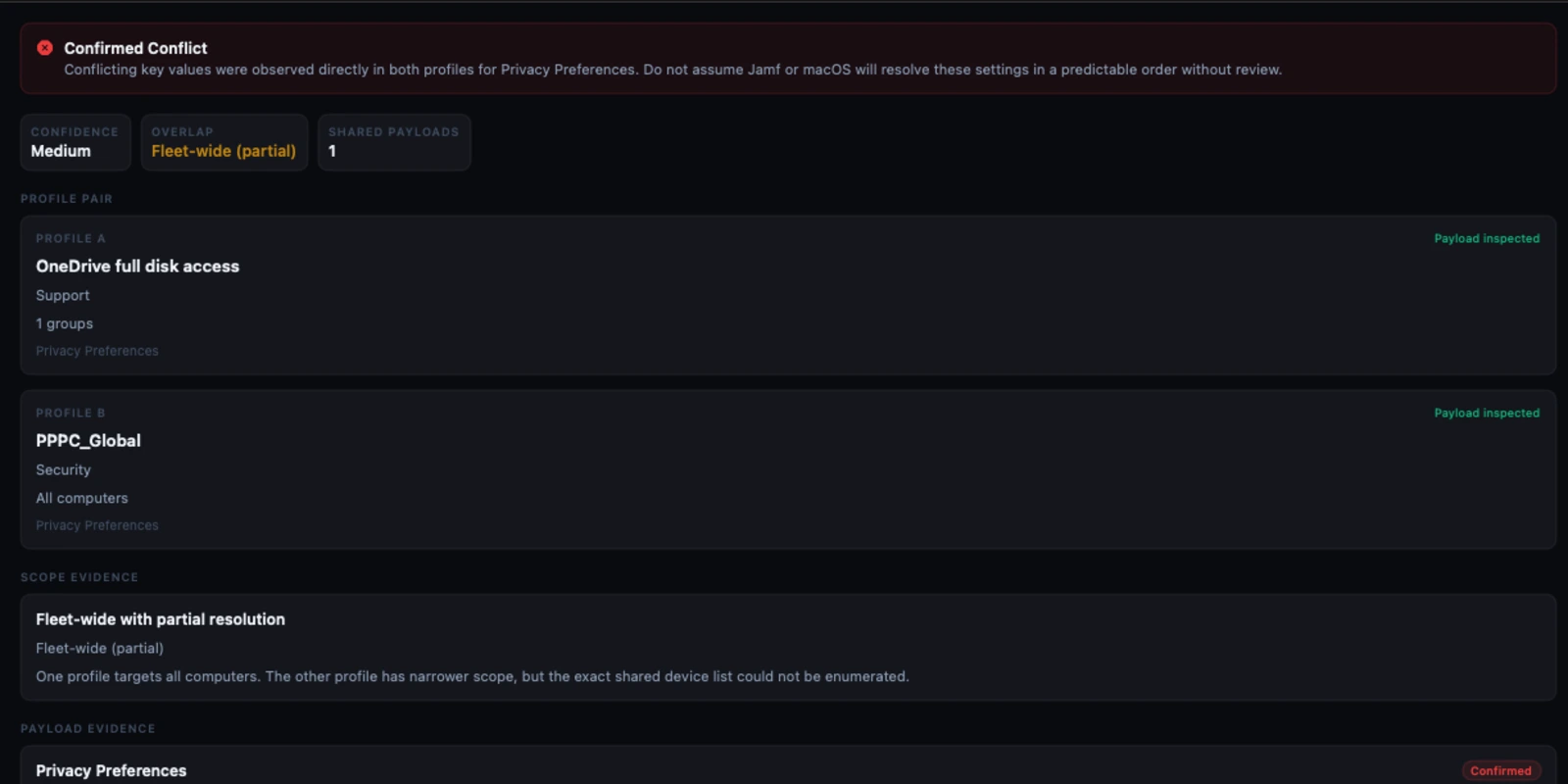
Profile Conflict Detection
Inspect overlapping configuration profile payloads with explicit classification, scope overlap evidence, and comparable payload keys.
Profile conflicts are difficult to reason about from Jamf alone, especially when payload overlap and scope overlap are both involved.
The conflict view separates confirmed payload overlap, derived scope overlap, and unresolved scope detail so the operator can see what is proven and what is partial.
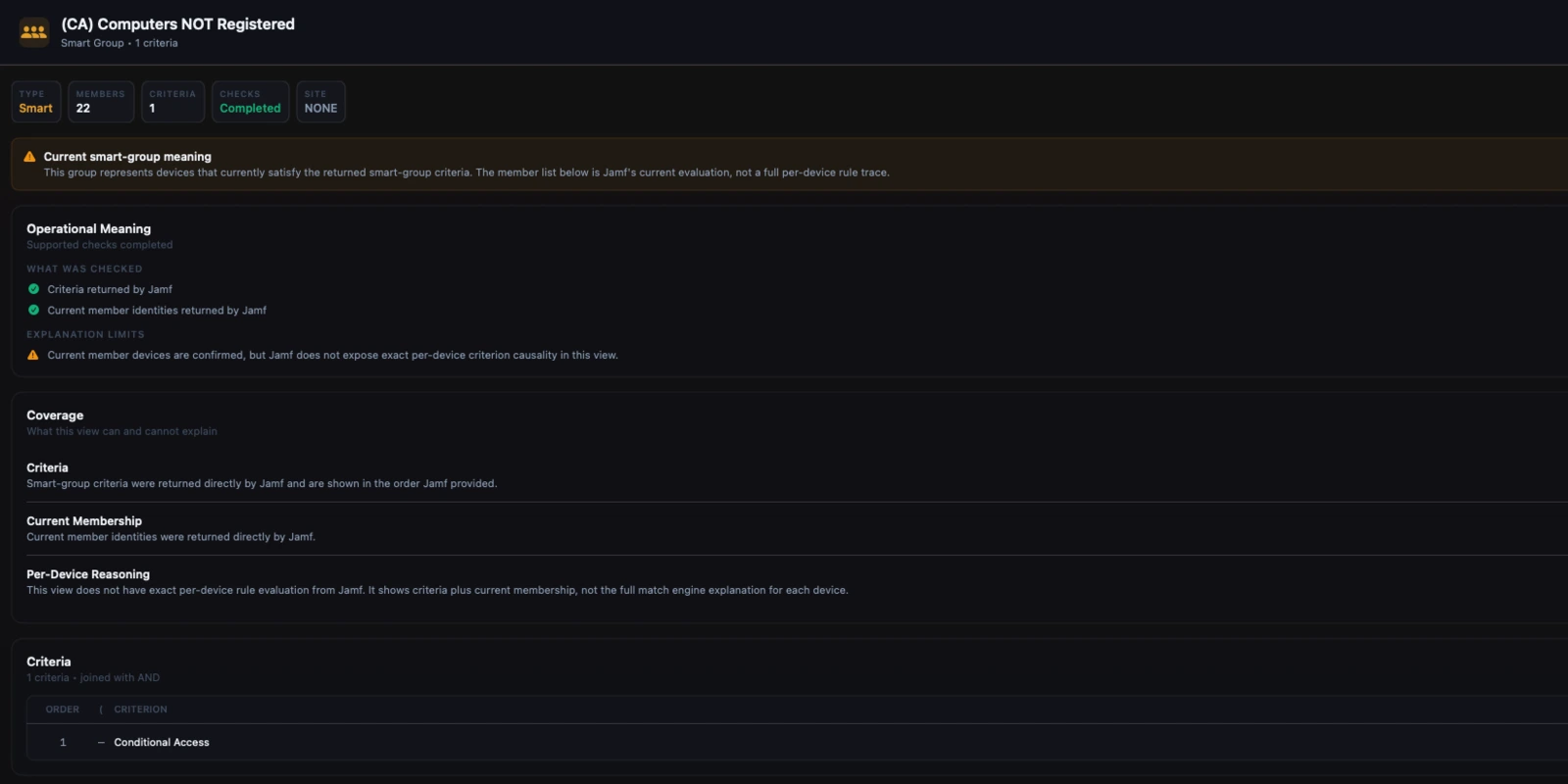
Scope Inspector and Smart Groups
Explain what targets a device or group, what excludes it, and what a smart group means operationally.
Targeting often fails because the administrator cannot quickly answer why something applies, why it does not, or whether the current explanation is only partial.
Scope Inspector surfaces inclusion, exclusion, observed membership, and partial-resolution limits. Smart Groups shows criteria directly and keeps causal limits honest.
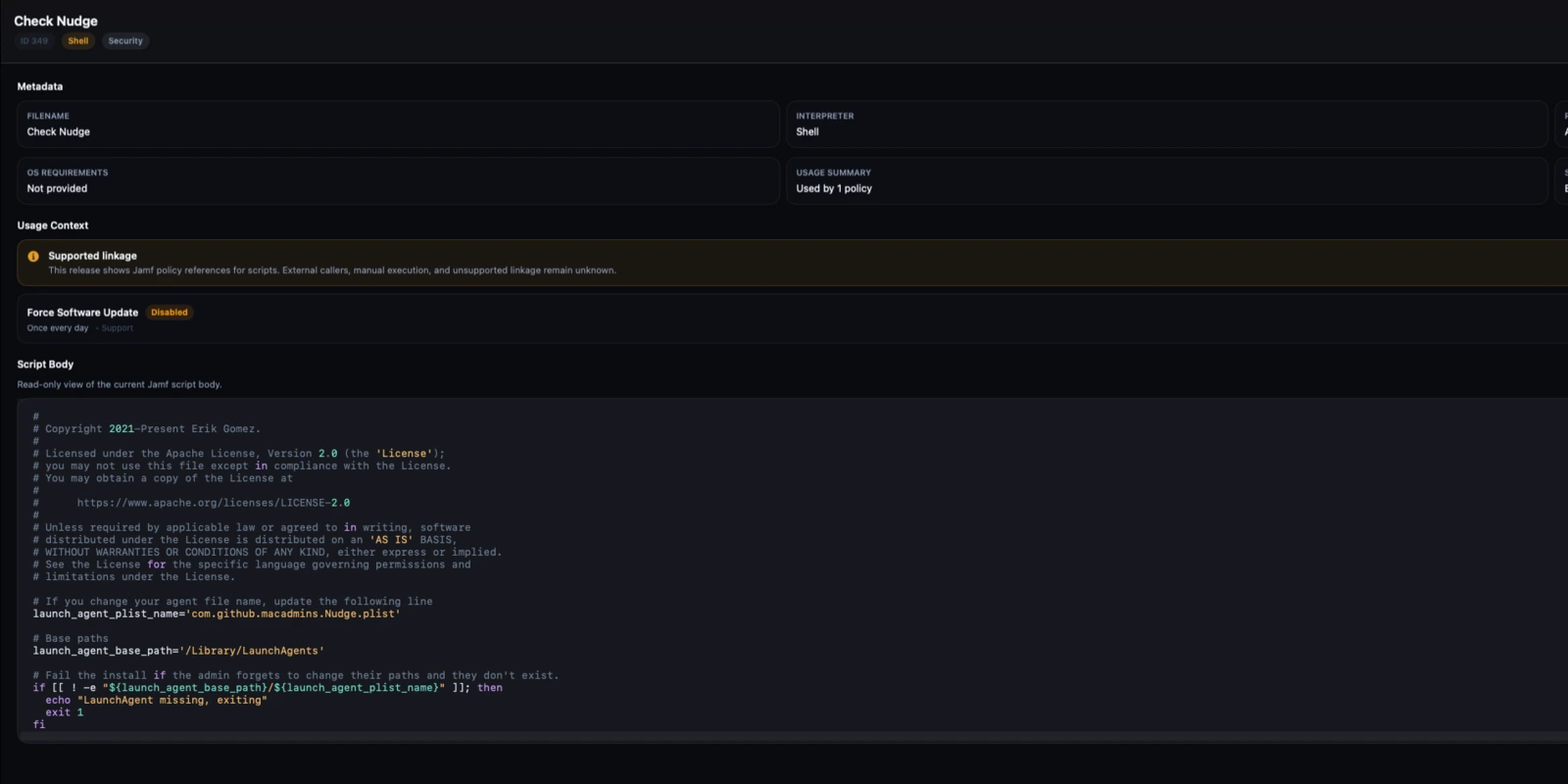
Script Library
Browse scripts with metadata, inspect bodies cleanly, review supported usage context, and make guarded edits when permissions allow it.
Large Jamf environments accumulate scripts quickly. Without readable context, change review becomes slow and error-prone.
The library keeps metadata, usage context, and the current script body together. It distinguishes supported Jamf linkage from unsupported external use.
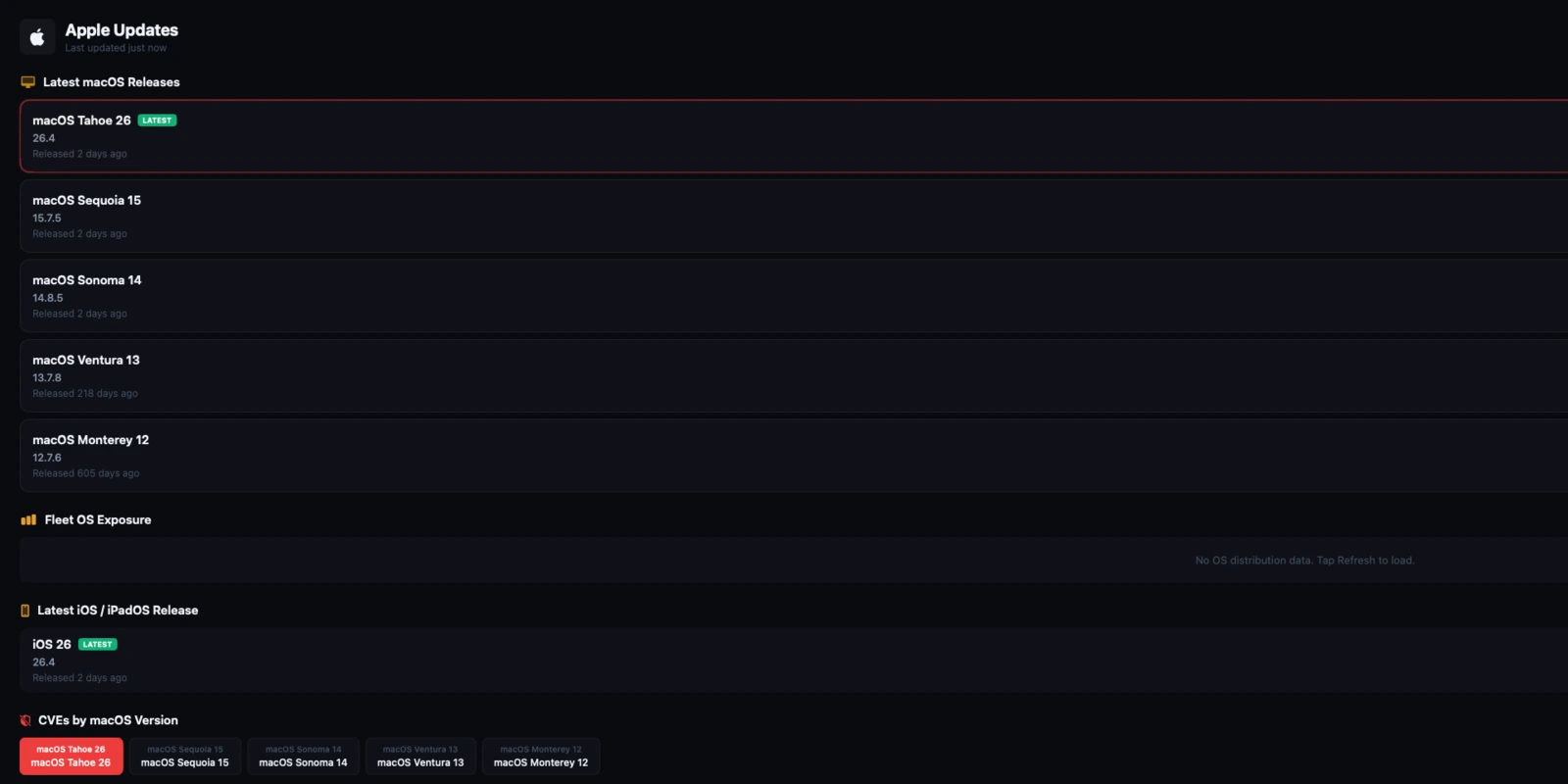
Patch Compliance and Apple Updates
Review patch status, version distribution, and current Apple release context in a way that stays tied to source data.
Patch posture matters operationally only when admins can see the denominator, unknown states, and drill-down evidence.
Compliance calculations use real Jamf counts, unknown states stay out of the denominator, and version distributions are labeled when partial.
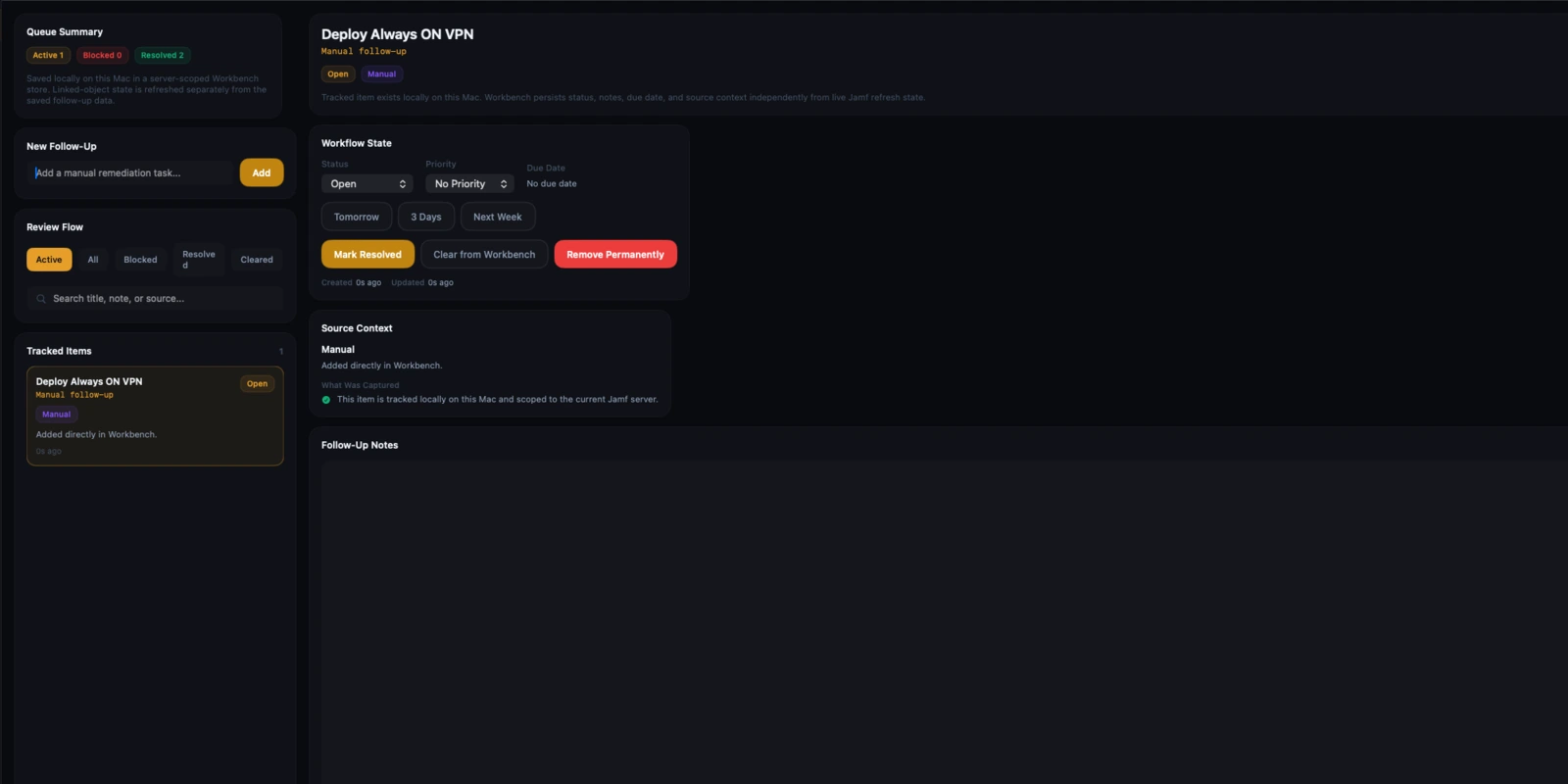
Workbench
Track remediation follow-up with durable local persistence, notes, status, due dates, and source context.
Review only helps if it can turn into tracked action. Bookmark-style follow-up is not enough in real administrative work.
Workbench stores server-scoped remediation items locally on the Mac and links them back to source findings where supported.
A local-first connection model that is easy to explain.
The product is designed so administrators can understand where credentials live, how Jamf is reached, and where evidence comes from.
Add one or more Jamf Pro servers
Create server profiles for production, staging, or client environments. Each profile keeps its own connection settings and local review state.
Authenticate with a Jamf API client
Veridominus uses Jamf API credentials you control. Credentials are stored in the macOS Keychain and exchanged for tokens during the session.
Load supported Jamf data locally
The app retrieves only the data needed for the workflows you use: inventory, groups, policies, profiles, extension attributes, scripts, and related operational surfaces.
Review evidence before acting
Dependency, cleanup, scope, conflict, and command workflows distinguish confirmed facts from partial or unsupported areas so the operator can make a deliberate decision.
The trust model stays close to the actual architecture.
Veridominus is sold as software, not as a hosted operational black box. The website, docs, and product language stay aligned with that.
Platform and connection model
Veridominus is built for administrators already working on the Mac. It uses the platform the same way the product does: local windows, local persistence, Keychain storage, and direct server communication.
Normal operation is direct from your Mac to your Jamf Pro server. There is no Veridominus backend sitting between your admin workstation and Jamf.
Credentials are stored in macOS Keychain. Normal product operation does not include analytics, telemetry, or hosted Jamf data processing.
Trust boundary facts
Jamf API client credentials are stored in the macOS Keychain. Tokens are session data, not plain-text config files.
The app relies on standard macOS trust evaluation. Internal or self-signed deployments require the issuing CA to be trusted by macOS.
There is no analytics SDK or usage telemetry pipeline in normal product operation.
Veridominus is read-first. Higher-impact workflows such as script saves or MDM command submission rely on the Jamf permissions you grant to the API client.
Built for the work between raw Jamf data and a safe administrative decision.
The product is not sold as a dashboard for its own sake. It is sold as a review and operations tool for administrators who need faster answers and clearer trust boundaries.
Why not just stay in Jamf Pro?
Jamf is still the control plane and system of record. Veridominus exists because review context, cleanup safety, scope reasoning, and some operational workflows are more efficient in a purpose-built native tool.
Why not use a cleanup utility only?
The product is broader than cleanup. It combines dependency review, targeting clarity, conflict investigation, lookup, command workflows, and persistent remediation follow-up.
Why it is worth paying for
The value is reduced review time, fewer risky changes, better operational visibility, and a calmer daily workflow for mature Jamf environments.
Simple Mac App Store pricing with no feature tiers.
Pricing is structured like a professional Mac application. There is a 7-day free trial, one product, and two billing cadences.
Includes the 7-day free trial and the full shipping macOS application.
Start Free TrialLower annual cost for administrators or teams who already know the workflow fits their environment.
View on the Mac App StoreThe website is not the only place the product is explained.
Documentation, security detail, getting started guidance, and support paths are part of the product surface. They should feel complete before purchase, not improvised afterward.
Documentation
Feature guides, setup detail, workflow limits, and technical reference material for evaluation and daily use.
Open docsGetting Started
Installation, Jamf connection setup, API permissions, token handling, and first-run guidance.
Read getting startedSupport
Operational support paths, required bug-report detail, billing help, and security contact information.
View supportA few decisions administrators usually verify before they install.
Does Veridominus replace Jamf Pro?
No. It works alongside Jamf Pro as a local review, investigation, and operations layer.
Where is Jamf data processed?
Normal operation is direct from your Mac to your Jamf Pro server. There is no separate Veridominus backend for routine analysis or review.
Are findings always deterministic?
No. Features that depend on incomplete or unsupported coverage are explicit about that. The product is designed to reduce overclaiming, not hide uncertainty.
Can I use more than one Jamf server?
Yes. Veridominus supports multiple server profiles so you can switch between production, staging, and other environments from the same app.
Review Veridominus the same way you would review any serious administrative tool.
Read the docs. Check the security model. Install the app. Connect a Jamf server you control. Then decide whether the review context, trust boundaries, and daily workflow improvements are worth keeping in your environment.